The problem
Mid-stream, you're fumbling for hotkeys, alt-tabbing to your production platform, and clicking through scenes while the audience watches. Every interruption breaks the flow — and the take.
- Hotkeys conflict with the apps you're recording
- Hidden menus during a live take
- Hands leave the instrument, camera, or guests
The solution
One physical trigger, one platform action. TriggerBridge listens to your MIDI gear and speaks fluently to your production platform — so a tap on a pad swaps the scene, fires the recorder, or pushes you live.
- Tactile, eyes-up control of your production
- Use the gear already on your desk
- Reliable mappings that don't conflict with anything
How it works
Three steps to a hands-free rig
Connect
Plug in any class-compliant MIDI device — pad controller, footswitch, keyboard, or full controller — and TriggerBridge detects it instantly.
Translate
Map MIDI notes, CCs, and program changes to specific platform actions inside an intuitive desktop UI. Save mappings as reusable profiles.
Control
Hit the pad. TriggerBridge fires the action in your streaming software with low-latency precision — every time, no fumbling.
Built for real production workflows
Profiles, platform status, MIDI connection, and platform control are visible at a glance — so you can focus on creating, not configuring.
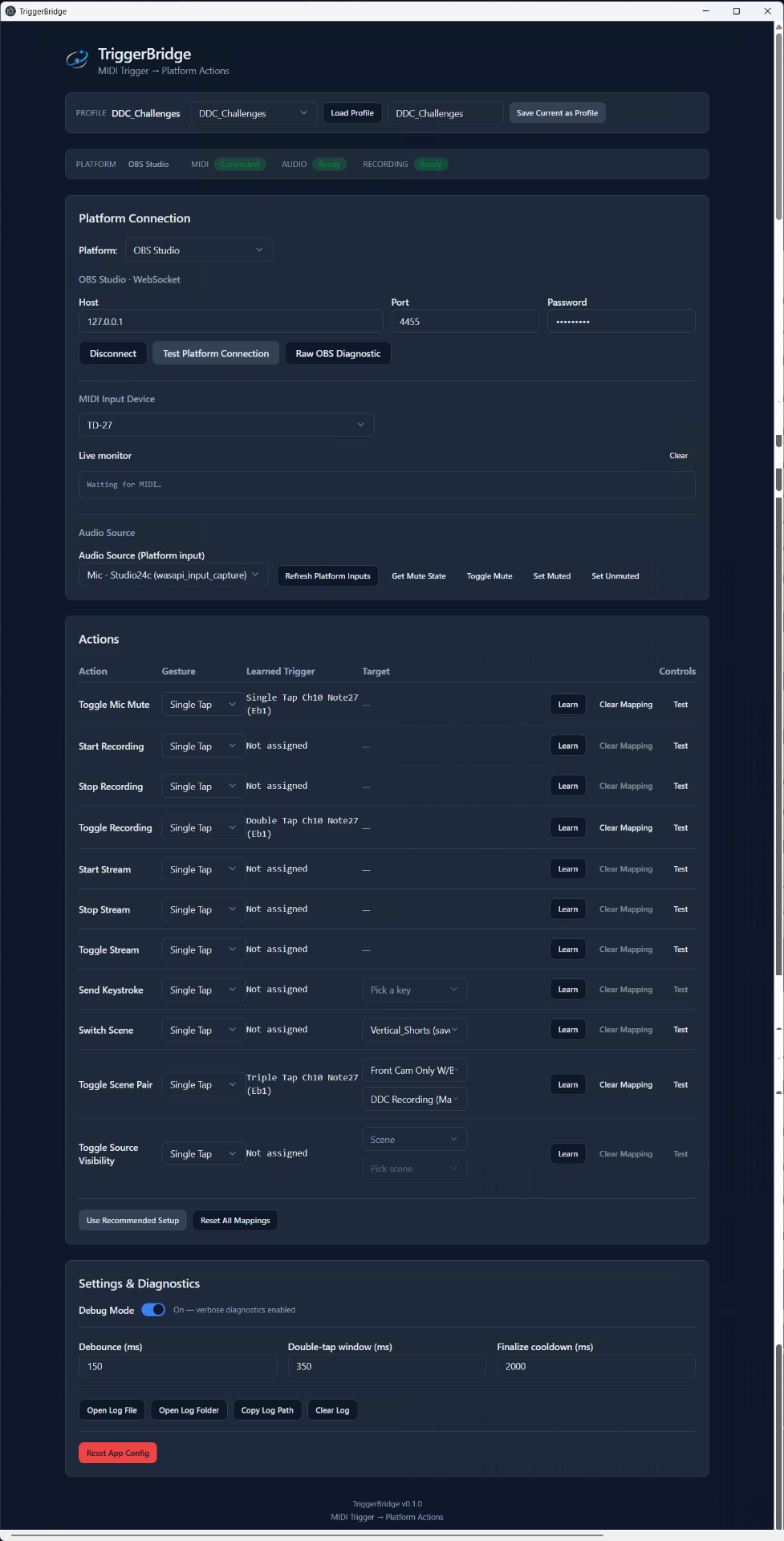
TriggerBridge desktop application
Features
Built for the way creators actually work
Production-grade controls, designed to disappear into your workflow.
Scene Switching
Cut between scenes instantly with a single pad. Build a tactile director's console for your show.
Streaming & Recording
Start, stop, and pause recording or streaming from your controller. Never miss the take.
Reusable Profiles
Save a different mapping for every show, instrument, or setup. Swap profiles in one click.
Hands-Free Workflow
Keep your hands on the instrument, the camera, or your guest. The pad does the production work.
Low-Latency MIDI
Tight, deterministic translation from MIDI event to platform action. Built for live work.
Multi-Platform Bridge
A provider architecture built to route MIDI into any supported production platform. OBS Studio today; more queued next.
Platforms
One bridge. Many destinations.
TriggerBridge is built around a multi-platform architecture. New targets ship as modules.
Built for OBS Studio today. Designed for additional production platforms tomorrow.
OBS Studio
SupportedFull integration today. Scene switching, source toggles, recording, and streaming all driven from MIDI.
Streamlabs Desktop
Coming SoonNative bridge in development. Bring the same tactile control to your Streamlabs production.
vMix
Coming SoonPlanned support for vMix's deeper switching, replays, and overlay controls.
Architecture ready for future platforms.
Use cases
For anyone whose hands are already busy
Musicians
Trigger loops and scenes without leaving the instrument.
Streamers
Switch scenes and overlays mid-stream with a single tap.
Podcasters
Run multi-cam recording from your guest's side of the table.
Educators
Swap camera angles and slides without breaking the lesson.
Churches
Volunteer-friendly tactile control for weekly services.
Small Studios
A reliable footswitch-driven workflow for solo operators.
Content Creators
Hands-free production for solo shoots and live takes.
Free during beta
Take control of your production workflow.
Download TriggerBridge for Windows and turn the MIDI gear on your desk into a hands-free production controller — in minutes.
Windows 10/11 · 64-bit · No account required
Resources
Docs, setup, and what's in the build
Everything you need to get TriggerBridge running on your rig.
Quick Start Guide
One-page walkthrough to install TriggerBridge, connect your MIDI device, and map your first trigger.
Open PDFFull Beta Guide
The complete installation and configuration reference — profiles, tap modes, scene pair toggles, and platform setup.
Open PDFBeta Release Notes
Current Features
- OBS Studio support
- Profiles
- Single / Double / Triple tap
- Scene pair toggle
- Streaming controls
- Recording controls
Known Issues
- Learn triple tap first, then double tap, then single tap
Guides
MIDI & OBS articles
How to Control OBS with a MIDI Pedal or Trigger
Map pads, pedals, and footswitches to OBS mute, recording, streaming, and scene actions.
Read guideWhy MIDI-to-OBS Workarounds Break
What makes multi-app MIDI chains fragile — and what to look for in a durable setup.
Read guideUse a MIDI Footswitch to Mute OBS or Start Recording
Hands-free mic mute, recording toggle, and scene switching from a single pedal.
Read guideSwitch OBS Scenes with a MIDI Pedal, Pad, or Drum Trigger
Move between scenes at the right moment — from behind the kit or across the room.
Read guideControl OBS Source Visibility with a MIDI Trigger
Show or hide overlays, cameras, charts, and lesson graphics without touching the mouse.
Read guideHands-Free OBS Control for Drummers and Music Instructors
Keep the lesson or performance flowing with MIDI-driven production actions.
Read guide
TriggerBridge is currently in beta. Features and setup steps may change before v1.
Questions or feedback? Email feedback@triggerbridge.app
FAQ